AI Presentation 2026 - LLM AI Command Line Interface (CLI)
Working with an LLM from a terminal, with access to local files and tools
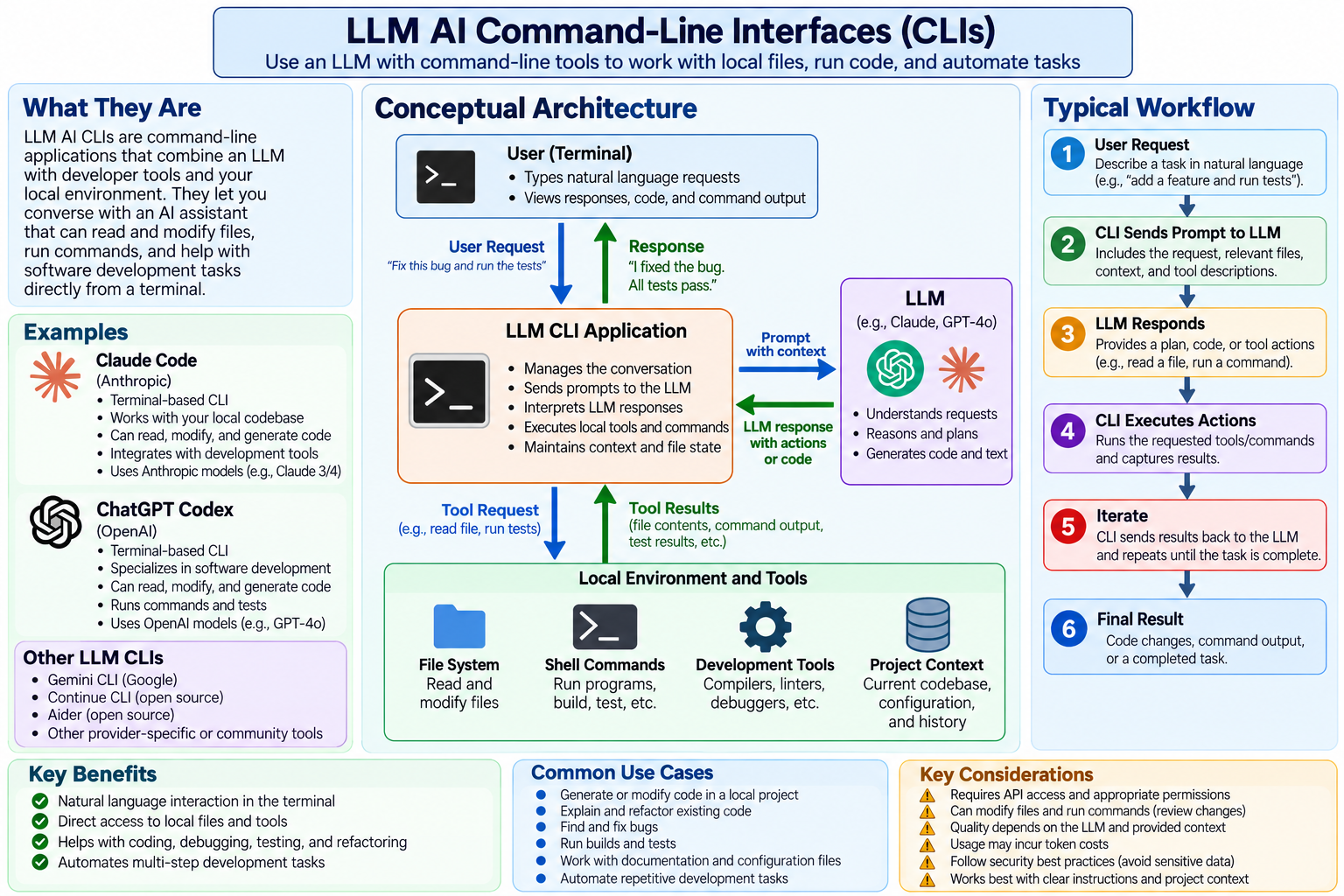
1. CLI Concept Diagram
The CLI is an alternate way to access LLM AIs without the security limitations of a browser or mobile app.
Its use requires downloading the CLI from OpenAI (ChatGPT) or Anthropic (Claude).
2. Notes
For now you can ignore everything except the 4 boxes in the middle of the page.
The User (Terminal) replaces the browser/mobile app from the previous page.
It uses the LLM CLI Application to handle interactions with the LLM instead of the browser application.
Unlike a browser or mobile app the CLI can read, edit, or delete files on your local computer.
CLIs have been used to create presentations and write or assist writing books. That is governed
by the law “garbage in = garbage out”, also known as AI Slop.
AI assistance can be very effective as long as it is used as an assistant, with the user providing
most of the content structure and ideas and carefully editing the output.
This presentation was created with a lot of assistance from the Claude Code CLI.